



In late September, the security firm Sucuri documented a WordPress backdoor called SC that rebuilt itself within seconds every time it was removed. For an organization, the risk is a site that has been reported as clean while the infection is still running, with access to the admin account, customer data, and on an e-commerce site, the checkout.
Curious Minds Media has been building and maintaining websites since 2004, and the standard approach to malware cleanup has been to find the infected file and delete it. SC is built so that approach fails. As Sucuri put it, “a modern WordPress infection can be a system rather than a file.” For leadership, the question to ask after an incident becomes whether the cleanup will hold.
What Is Self-Healing WordPress Malware?
Self-healing WordPress malware keeps copies of itself in several places at once, including the site’s files, its database, its scheduled tasks, and the server’s memory. When one copy is deleted, another writes it back, often on the next page load. A lasting recovery removes every copy in the right order and then closes the gap the attacker used to get in.
How SC Protects Itself
SC spreads at least eight copies of itself across a WordPress site. Some sit in configuration files that load before the rest of the site, one hides inside the site’s theme, and two pose as ordinary plugins, one of them with a convincing fake settings page. More copies live in the site’s database and, on servers that support it, in server memory, where a file cleanup never reaches. Scheduled tasks reinstall the infection on a timer whether or not anyone visits the site.
Once it is running, SC removes itself from the WordPress dashboard, creates a hidden administrator account, and can sign in as that account without a password. It takes its instructions from a smart contract on the Ethereum blockchain, a technique researchers call EtherHiding, so there is no single server to take offline. Those instructions can include code that skims payment details at checkout on a WooCommerce store, along with orders to remove the site’s security plugins. A site in that state can look normal to everyone managing it.
Other Self-Healing Infections This Year
SC is part of a broader pattern. In September, Wordfence published an analysis of a malicious plugin, found during a site cleanup in mid-June, that was built to survive removal and also used EtherHiding. In October, the premium version of a popular SEO plugin, Rank Math SEO PRO, shipped with malware in copies downloaded or updated between October 15 and October 16. Rank Math told customers who activated an affected copy to treat their sites as compromised. Wordfence noted that updating to the clean release does not remove what the malware left behind.
Why Does WordPress Malware Keep Coming Back After Cleanup?
A typical cleanup scans the site’s files, deletes what the scanner flags, and replaces altered WordPress files. Against SC, all of that can succeed and the site still comes back infected, because the copy in the database restores everything on the next visit. Security scanners have limits here too. One of the scanning vendors we work with confirmed to us that its scanner can currently miss hidden code stored in the database, a gap it plans to close. We treat a clean scan as one piece of evidence among several.
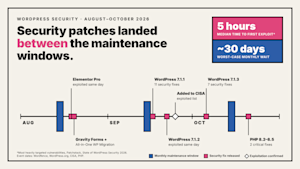
Infections can also hide in two separate scheduling systems, one inside WordPress and one in the hosting account, and a cleanup that checks only one leaves the other free to reinstall the malware. Restoring from a backup has a similar weakness, because a backup taken after the infection began brings the hidden copies back with it. Even the restore tool can be a risk. In August, Wordfence received a report of a flaw in All-in-One WP Migration and Backup, a plugin on more than five million sites, that let an attacker plant code that ran when an administrator restored a backup. The vendor fixed it in version 7.110.
What a Complete Recovery Includes
We follow the cleanup order Sucuri recommends, which removes the pieces that rebuild the others before touching anything else. We disable the loader first, then clear the copies in the database and server memory, the scheduled tasks, and the hidden administrator account. Only then do we remove the infected files, in a single pass. The order also protects uptime, because deleting the wrong file too early can take the whole site offline for up to five minutes. We finish by changing every password and access key the attacker could have reached, and by resetting the site’s encryption keys, which signs out every session, including the attacker’s.
Recovery also has to address what the infection left behind. Spam pages can stay in Google’s index, and Google Search Console can keep reporting security issues for the site until someone requests a review. On one site we support, old pages kept having problems in search after the original hack was fixed, and we recommended checking the database for leftover malicious links. On shared hosting, reputation damage from an incident can follow a site’s server address for months through ISP block lists and security vendor queues, which is one reason we treat hosting decisions as security decisions.
How We Approach Prevention
It is not known how SC got into the site Sucuri analyzed, but recent incidents show the usual routes in. WordPress released a security fix on September 22 for a serious flaw, and Patchstack recorded attackers trying to exploit it the same day. Attackers began exploiting a file upload flaw in Elementor Pro, a page builder on more than six million sites, on August 19, the day the fix shipped. The Rank Math incident shows how a trusted vendor can become the way in, and stolen passwords remain the simplest route of all. On one client’s code repositories, we caught an outside party pushing code and replaced the compromised credentials before any damage was done.
On the sites we maintain, we test updates in staging before they reach the live site, monitor for new vulnerabilities continuously, and run layered firewalls that block known attacks while a fix is applied. When a WordPress core vulnerability surfaced in July, that setup protected our clients’ sites within the first day. After one client site was reinfected following an earlier hack, we made two-factor authentication and restricted editing of configuration files a requirement on every site we maintain.
What to Ask After Any WordPress Cleanup
If your site was cleaned recently, by us or anyone else, a few questions will show whether the work will hold. Ask whether the provider checked the database as well as the files, reviewed the hidden plugin and configuration folders, and checked both scheduling systems. Ask whether every password and access key was changed afterward, and whether anyone confirmed in Google Search Console that the site is clear. Then ask what monitoring will catch the infection if it returns. A provider who can answer each question specifically has treated the infection as a system.
For a national cybersecurity firm we work with, we coordinate with the internal application security team on plugin reviews, change approvals, and monthly audit requirements. Curious Minds Media’s in-house, US-based engineers build security monitoring and hardening into every WordPress maintenance plan. If your site keeps getting reinfected after cleanups, we can start with an assessment of the full environment.