

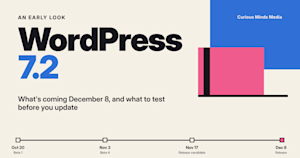






WordPress 7.2 is due out on December 8, 2026. It's the third big WordPress release this year, after 7.0 in May and 7.1 in August. The list of features was locked in at Beta 1 on October 20, so we now have a good idea of what's in it.
We've taken care of WordPress sites at Curious Minds Media since 2004. About 85 percent of the sites we look after were built by someone else before they came to us, so a lot of our work happens on sites with custom code, payment systems, and other tools plugged in. Below is what we know about 7.2 so far and what we're checking for our clients before it ships.
When is WordPress 7.2 released?
Key dates: Beta 4 on November 3, the first release candidate on November 17, and the final release on December 8, 2026.
The release date is December 8, 2026, though the testing schedule has moved a bit. Beta 3 came out a week early on October 28, at the same time as a security update for WordPress 7.1, and Beta 4 came out on November 3. One more beta is planned for November 10. The first release candidate is due November 17, and that's when the WordPress team publishes its Field Guide, which lists every change in detail for developers.
If you look after a site, now is a good time to test. Bugs that people report during the beta can still be fixed before the release. After November 17, the WordPress team mostly works on fixing what's already in it.
Why security comes first in this release
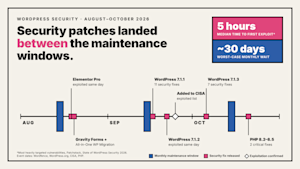
This fall was a busy one for WordPress security. WordPress put out four security updates between September 17 and October 28. The most serious problem was fixed in WordPress 7.1.2 on September 22. It could let an attacker run their own code on some sites, and within three days the U.S. Cybersecurity and Infrastructure Security Agency added it to its list of actively exploited vulnerabilities. WordPress 7.1.4 on October 28 fixed another group of issues, including one in the update process itself.
Plugins had problems too. Wordfence disclosed a flaw in All-in-One WP Migration and Backup, which is installed on more than five million sites, that an attacker could use to take over a site. Patchstack's State of WordPress Security in 2026 report counted 11,334 new vulnerabilities across WordPress plugins, themes, and core in 2025, up 42 percent from the year before, and 46 percent of them had no fix ready when they were made public. We've seen how fast this moves. When a serious WordPress core flaw was disclosed in July, the firewall protection on the sites we maintain had it covered within the first day. With all of that going on, we're glad the biggest change in 7.2 is about keeping sensitive information safe.
A safer place for passwords and API keys
Most business websites are connected to other services, like a payment processor, an email tool, a CRM, or an AI tool, and each connection needs a password or key. Until now, WordPress didn't have a safe place to store them, so plugins saved them in the database, usually in plain text. Eric Mann, who wrote the proposal for the new Secrets API, pointed out that this means those keys get copied into every backup, every database export, and every staging site.
The new Secrets API gives WordPress one standard place to store these keys, and it encrypts them. Hosting companies can also connect their own secure storage. WordPress plans to add a screen for managing these keys in the dashboard in version 7.3.
The API protects keys if a backup or database copy ends up in the wrong hands. It can't stop harmful code that's already running on a site. It also only helps once plugins start using it, so the keys your plugins store today will stay where they are until each plugin is updated. We expect that to take some time.
What to set up before an emergency
We found one detail in the 7.2 code that we think every site owner should know about. If a site doesn't set its own secrets key in its configuration file (the setting is called WP_SECRETS_KEY), WordPress creates the key from the site's security salts. After a security incident, one of the normal cleanup steps is to change those salts, because doing so logs everyone out. On a site using the default setup, changing the salts also changes the key that unlocks the stored passwords.
That's why we recommend setting a separate secrets key before plugins start using the new system. If your team keeps a checklist for what to do after a hack, add it there too.
Application passwords
The 7.2 roadmap also included tighter rules for application passwords, which are the logins other apps use to connect to a site, including an email alert when a new one is created. These didn't show up in the beta announcements, so we'll confirm what made it in when the Field Guide comes out.
A faster admin, with one thing to check
Since 2009, WordPress has combined the files that run its admin area into a few large files, a shortcut that made sense for older browsers. WordPress 7.2 drops that approach. Each file now loads on its own, browsers can save them for next time, and the admin loads the next screen you're likely to visit ahead of time. WordPress developers tested the change and found that the Dashboard, the Posts screen, and the editor load faster.
For most sites, the admin will just feel quicker. Older plugins, custom admin code, and security rules built around the two old combined files could run into problems. Security tools have watched those two files for years because they were a common target for attacks that flood a site with traffic. We're checking for all of this on every site we maintain.
What’s new for writers and editors
Notes, the comment feature added in WordPress 6.9, now sits in the margin next to your content. You can react to notes with emoji, and you can keep them open while you work on block settings. A suggestion mode, where reviewers propose edits and the writer accepts or rejects them, was planned but didn't make it into this release.
There are more design options, too. Editors can add text shadows, change some settings by screen size (like how many columns a gallery shows on a phone), and style form fields and buttons for the whole site without writing code. Block settings now show which styles come from the site-wide design. Menus can also be edited from the Site Editor sidebar.
If your site follows strict brand guidelines, we recommend deciding with your developer which of these new options your editors should use.
Images, the dashboard, and a new /random/ link
WordPress can now shrink and convert images in your browser before they upload, including from the Media Library. That saves work for the server, which helps on hosting plans that struggle with image processing. The admin also gets new icons, clearer error messages, and an On This Day section on the dashboard that shows posts from the same date in past years.
There's also a new /random/ link that sends visitors to a random post. Since SEO is part of the work we do for clients, we looked at the code to see how search engines will treat it. It uses a temporary redirect and tells search engines not to index it, which is what we'd want. If a site already has a page at /random/, that page wins, and developers can turn the feature off. We'll still check crawl reports on larger sites after the update.
Changes behind the scenes
For developers, 7.2 adds to the Abilities API, which gives AI tools and other software a standard way to read information from a site. It now includes six built-in abilities. Most of the bigger AI features are still being built in WordPress's separate AI plugin, and they'll only move into WordPress itself once they prove useful.
The minimum server requirements haven't changed. WordPress 7.2 still needs PHP 7.4 and MySQL 5.5.5. After the update, WordPress runs a database update the first time an administrator opens the dashboard, and networks that run many sites from one install (multisite) need to run the network update too. On a big site, we recommend testing that step on a staging copy first.
Ipsum, the new default theme
WordPress 7.2 comes with a new default theme called Ipsum, named after the lorem ipsum filler text designers use. It's a simple theme built for blogging, with seven color options named after times of day, from Blue Hour to After Hours. Ipsum is only the default for brand-new sites, so your current site keeps its theme.
What didn’t make it into 7.2
A few planned features will have to wait. Sudo mode, which would ask for your password again before risky admin actions, isn't in this release, and neither is suggestion mode for Notes. The Table of Contents and Description List blocks were also left out. Real-time editing, where several people work on a page at the same time, was left off the 7.2 plan while the WordPress team works through some big decisions. Features that miss the beta usually show up in a later version.
How we’re getting client sites ready
Some hosting companies now run WordPress updates on their own schedule. Their emails say the update finished, but they also say they don't test whether the site still works. We saw this in October, when one host rolled out WordPress 7.1.3 to sites in our care on a Friday evening. We test 7.2 on a staging copy before December 8, so the host's update isn't the first time anyone sees 7.2 on that site.
Plugins are changing at the same time. When WordPress 7.1 changed how the editor loads, older blocks built with ACF started showing their fields in the sidebar, and ACF released a newer block format with a temporary fix. Our team caught this on client sites after the 7.1 update, and the notice about it is easy to miss because it only shows up inside ACF's own settings screens. Custom code can break in less obvious ways, too. On one site in our care, a routine homepage image change took the site down, most likely because the theme's custom blocks hadn't kept up with the version of WordPress underneath them. Gravity Forms 3.0 also changed how its buttons are built, which can break custom button styles. We're checking how that works with the new site-wide button styles in 7.2.
For our clients, our 7.2 review looks at older plugins and custom admin code, firewall rules tied to the old combined files, the database update on large and multisite installs, and which plugins store API keys and whether they plan to use the new Secrets API. For online stores, we plan the update around busy sales periods. For clients with their own security teams, we follow their approval process and coordinate with internal security teams on plugin reviews, change approvals, and monthly audits.
If you want to try 7.2 before it comes out, you can install the beta on a staging copy of your site with the WordPress Beta Tester plugin, or test it in your browser with WordPress Playground. If you'd rather leave that to us, our WordPress maintenance plans cover it. Our in-house, US-based team reviews each WordPress update and tests it on staging wherever possible before it goes to your live site.