




For most of the time we have maintained WordPress sites, a monthly update window was a sound way to run maintenance. Updates were batched, tested on a staging copy of the site, applied on a predictable day, and documented for the client. That cadence still works well for most of what a maintenance plan covers. It no longer works as the only path for security patches. Attackers now start using a newly disclosed WordPress vulnerability within hours, while a monthly cycle measures its response in weeks.
For an organization that depends on its website for leads, sales, or customer service, that gap is a business risk first. A compromised site can go down during a campaign, expose customer data, or create a compliance problem in a regulated industry. On a business-critical platform, a security incident rarely affects just one thing.
How often should WordPress be updated?
Routine plugin, theme, and core updates can run on a monthly or weekly schedule. Security patches need a separate track that responds within hours. In its State of WordPress Security in 2026 report, Patchstack found that the most heavily targeted WordPress vulnerabilities were exploited a median of five hours after disclosure. Roughly half of high-impact vulnerabilities were exploited within 24 hours.
Where WordPress vulnerabilities come from
Patchstack’s report covers vulnerabilities disclosed during 2025. It counted 11,334 new vulnerabilities across the WordPress ecosystem, a 42% increase over the prior year, and classified 36% of them as serious enough to need its mitigation rules. Plugins accounted for 91% of new vulnerabilities and themes for 9%, with only six reported in WordPress core. For most organizations, the exposure sits in the plugins that run their forms, e-commerce, memberships, search, and integrations. Each of those plugins has a different developer behind it, working to its own release schedule.
What one fall of WordPress patches looked like
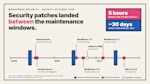
We tracked the following security notices across the sites in our care between August and October 2026. Each one called for a response well inside a monthly cycle.
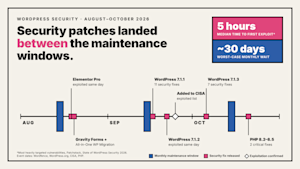
The plugin fixes came first. On August 19, Elementor fixed a critical flaw in Elementor Pro, a page builder running on more than six million sites. The flaw let attackers upload malicious files without logging in. Wordfence reported that attacks began the same day, and its firewall blocked more than 190,000 attempts.
The next day brought two more fixes. Gravity Forms, a widely used form plugin, fixed a similar high-severity upload flaw. All-in-One WP Migration and Backup, a backup tool on more than five million sites, fixed a flaw that let an attacker without an account plant database commands that run when an administrator restores a backup.
WordPress core came next. Version 7.1.1 shipped on September 17 with 11 security fixes. On September 22, WordPress 7.1.2 fixed a critical flaw in WordPress itself. On sites with certain theme and server setups, it could let an attacker run their own code without logging in. It was rated 9.2 out of 10 on CVSS, the industry’s standard severity scale.
Patchstack recorded the first exploitation attempt the same day the patch shipped. On September 25, CISA, the federal cybersecurity agency, added the flaw to its catalog of vulnerabilities confirmed to be under active attack. WordPress 7.1.3 followed on October 6 with seven more security fixes.
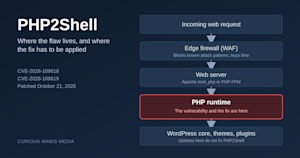
The last notice reached below WordPress entirely. On October 21, the PHP project, which maintains the programming language WordPress runs on, fixed two critical flaws. Sites on PHP 8.1 or older received no official fix, so their protection depended on how quickly their hosting provider applied one.
Consider a site whose monthly maintenance ran in mid-August. By the time its next window came around, the Elementor Pro, Gravity Forms, and All-in-One WP Migration fixes had been available for nearly four weeks. By the window after that, the 7.1.2 core flaw had been on CISA’s list of actively exploited vulnerabilities for about three weeks.
Why a monthly window leaves a gap
On a monthly schedule, a patch released the day after maintenance waits close to 30 days before it reaches the live site. A patch released at a random point in the month waits about two weeks on average. Patchstack puts the exploitation window in hours, so both of those delays leave a site exposed for the whole period when attacks are most concentrated.
WordPress core covers part of this on its own. Sites that allow WordPress to update itself install minor and security releases of core as soon as they ship. That leaves plugins and themes as the main source of exposure between maintenance windows. A weekly window shortens the wait for those components, but it still measures the gap in days.
Older vulnerabilities also stay in circulation on sites that never caught up. Patchstack noted that only four of the ten most targeted vulnerabilities it observed in 2025 were published that year.
When there is no patch to apply
Patchstack also reported that 46% of vulnerabilities disclosed in 2025 had not received a fix from the developer by the time they were made public. A faster update schedule does not help in those cases, because there is nothing to install yet.
Firewall rules can cover part of that gap, and they often arrive before the patch does. Wordfence sent its paid customers a firewall rule for the Gravity Forms vulnerability on August 13 and one for the All-in-One WP Migration vulnerability on August 16. The patches for both shipped on August 20.
Hosting-level protection helps, but it does not stop most attacks on its own. Patchstack reports that 74% of WordPress vulnerability exploits bypass leading hosting defenses. That is why we pair hosting firewalls with monitoring at the WordPress level on every site we maintain.
The October PHP release showed the same gap one layer down. When that advisory arrived, we started with the sites in our care that sit outside a managed hosting firewall, because those had the least protection while hosts rolled out fixes.
Automatic updates do not close the gap on their own either. Premium plugins sold outside the official WordPress.org plugin directory, and plugins that are no longer supported, may not update through the standard mechanism. The site being updated can also block the update tool, when a plugin conflict or the site’s own security rules reject the tool’s requests. An automated run can even report a failure on sites where the update went through.
We verify installed versions after each run, and our maintenance checklist includes a vulnerability scan. That way, a site that reports itself as current gets checked against what is installed.
Why faster patching needs its own safeguards
Faster patching carries its own risk. In March 2026, WordPress 6.9.2 shipped as a security release covering ten vulnerabilities, and within hours site owners reported blank pages after updating. The release was pulled, and 6.9.3 fixed the crash later that day. A day later, 6.9.4 completed three patches that had not been fully applied. Sites that rolled back to get past the crash lost the security fixes along with it.
Updates also arrive outside any window we set. Managed hosts apply WordPress core security releases across their platforms on their own schedule, sometimes on a Friday evening. Their notices confirm that the upgrade completed, but say they did not test how each site functions afterward. On one site we maintain, the host applied 7.1.2 to the live environment, which then began misbehaving. The staging copy was still on 7.1.1 and worked as before. Comparing the two environments gave us a quick starting point for finding the cause.
Pushing every update to the live site the moment it appears trades one kind of risk for another. The approach we trust is a separate track for security updates. That track gets its own triage, a shortened test cycle, and a rollback plan that keeps the fix in place.
How Curious Minds Media separates routine updates from security response
At Curious Minds Media, we run WordPress maintenance on two tracks. Routine core, plugin, and theme updates go through the scheduled cycle. We review them for compatibility, test them in staging where possible, and apply them at a time that suits the site’s operational calendar. Sites with no custom theme or custom plugins are good candidates for automated updates, which we schedule overnight. Sites with custom code go through manual review.
Security issues follow a separate path. Our in-house, US-based engineers monitor for vulnerabilities continuously and set priorities from the vulnerability list for the sites in our care. A flaw that a firewall rule already blocks, often called a virtual patch, ranks below one on a site that cannot be upgraded. Sites reporting that no patch is available get a closer look, and in some cases a conversation with the client about removing or replacing the plugin.
When a disclosure calls for an immediate patch, we follow a shortened process. We patch staging, confirm that key functionality still works, patch the live site, and then run final QA. Before any emergency patch, we confirm a current backup exists, and we verify that recovery procedures work before we need them. If a site is close to its next full maintenance cycle, we fold the patch into that cycle. If maintenance ran recently, we apply the emergency patch on its own.
We pair that response with hardening that limits how much damage any single vulnerability can do. Across the sites we maintain, we require two-factor authentication and disable file editing from the WordPress dashboard. That restricts what an attacker can change even after gaining a foothold. We apply the same protection to the remote management tools we use to deploy updates, since those tools have access to every site they manage. For organizations with their own security staff, we coordinate plugin reviews and change approvals with that team, as we do with GuidePoint Security’s internal application security group.
What to ask about your current maintenance arrangement
For leadership, the question worth asking is how quickly the team responds when a critical patch lands between maintenance windows. A few specific questions will show whether that response exists. Ask who watches vulnerability disclosures for the specific plugins on your site, and how quickly they act when one is rated high severity. Ask what happens when a vulnerability is public and the plugin developer has not released a fix. Ask whether premium and unsupported plugins are checked separately from the ones that update through the WordPress.org directory, and whether anyone flags plugins that have stopped receiving updates altogether. Ask who reviews the site when your host applies a core update on its own schedule. Finally, ask how an emergency patch is tested and how it would be rolled back without losing the security fix.
If any of those questions lack a clear answer, our WordPress Maintenance and Support Plans show how we handle each one.
Curious Minds Media has maintained WordPress sites since 2004. The monthly window is still how we handle most updates, and the security response runs on its own schedule alongside it. For larger organizations with internal security teams, we build that response around their existing review and approval process.